

You’re doing the same analysis over and over again.
Every time you evaluate a new stock, you explain what ROIC means. You remind the AI to pull data from SEC filings, not Yahoo Finance. You specify that you want segment-level breakdowns, not just consolidated numbers. You ask for the same output format you’ve requested dozens of times before.
By the time you’ve typed all your instructions, you’ve spent 10 minutes setting up a conversation that should take 2 minutes. And next week, you’ll do it all again.
Claude Projects solves this problem. Think of it as creating a specialized analyst who already knows your methodology, your preferences, and your process. You build the workflow once and reuse it whenever you need that type of analysis.
Here’s how to stop repeating yourself and start analyzing companies faster.
The Problem: Context Resets Cost You Time
Every new AI conversation starts from zero. The AI doesn’t remember that you prefer operating margin to net margin. It doesn’t know you want three years of data, not five. It doesn’t recall analyzing competitive positioning before looking at financials.

For one-off questions, this is fine. For systematic investment analysis, it’s inefficient.
Most investors solve this with copy-paste. They keep a document of standard prompts and paste them into each new conversation. This works, but it’s clunky. You’re still manually assembling context every time.
The real cost isn’t the typing. It’s the cognitive load of remembering what to include and the friction that makes you skip useful analysis steps because they’re annoying to set up.
The Solution: Projects as Persistent Analytical Frameworks
Claude Projects let you save custom instructions that apply to every conversation within that Project. Create a Project called “Initial Stock Screening,” provide instructions for your screening methodology, and ensure every conversation in that Project starts with that context already loaded.
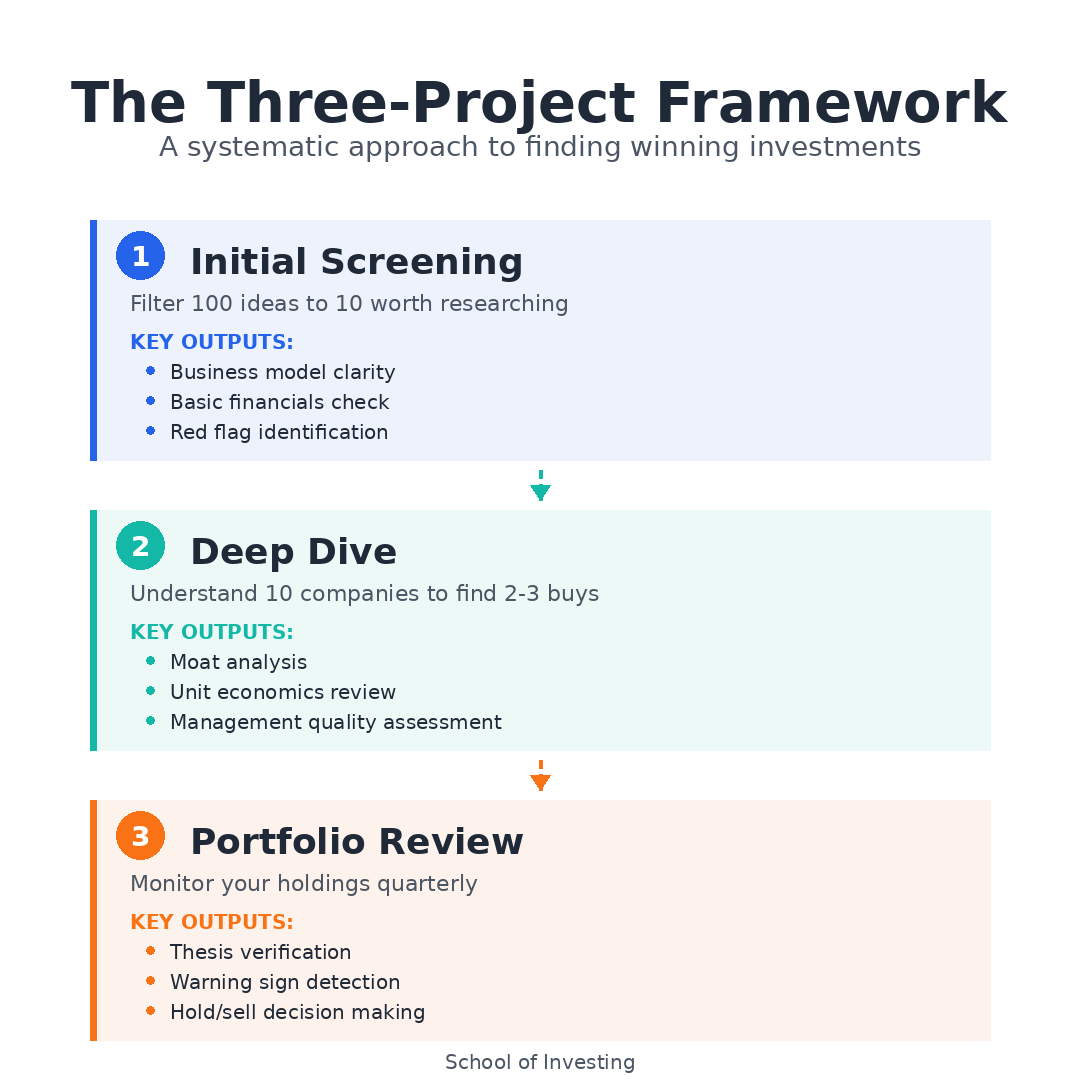
You’re not teaching the AI how to help you. You’re working with an analyst who already knows the job.
The key insight: different analysis tasks need different contexts. You don’t want the same instructions for quick screening, deep competitive analysis, and portfolio reviews. So you create multiple Projects, each tuned for a specific workflow.
Three Core Investment Workflows
Workflow 1: Initial Screening Analysis
What this handles: First-pass evaluation when a company hits your radar. You need basic financials, a business model overview, and red flags identified quickly.
Custom instructions for this Project:
You are helping with initial stock screening for value investing. When analyzing a company:

1. Business Model First
   - Describe what the company actually does in 2-3 sentences
   - Identify primary revenue streams
   - Note the competitive landscape (who are the main competitors?)

2. Financial Overview (last 3 years)
   - Revenue growth rate
   - Operating margin trend
   - Free cash flow as % of revenue
   - Return on invested capital (ROIC)
   - Debt-to-equity ratio

3. Red Flag Check
   - Declining margins
   - Negative or deteriorating free cash flow
   - High customer concentration
   - Frequent management turnover
   - Accounting irregularities

Output Format:
- Start with one-paragraph business summary
- Present financials in a simple table
- List any red flags as bullet points
- End with "Worth deeper analysis: Yes/No" and brief reason

Data Sources:
- Pull all financial data from SEC filings (10-K, 10-Q) only
- Cite specific filing and page when providing numbers
- If you cannot verify a metric from SEC documents, state this explicitly
How to use it:
Drop a company name into a new conversation. The AI already knows to structure the analysis the way you want it. You get consistent output every time, which makes comparing companies easier.
If you’re screening five companies in a sector, you can open five conversations in this Project and get parallel analysis in the same format.
What this replaces:
Those 3 AM research sessions where you’re clicking through Finviz, Seeking Alpha, and SEC filings trying to piece together whether a company is worth your time. Now you get a structured first pass in minutes.
Workflow 2: Deep Dive Competitive Analysis
What this handles: After a company passes initial screening, you need to understand competitive positioning, moat durability, and unit economics.
Custom instructions for this Project:
You are helping with detailed competitive analysis for value investing decisions. When I provide a company name:

1. Competitive Position Assessment
   - Map out the competitive landscape (who competes, how they compete)
   - Identify the company's specific competitive advantages
   - Evaluate moat strength (network effects, switching costs, scale advantages, intangibles)
   - Note vulnerabilities to competition or disruption

2. Unit Economics & Profitability Drivers
   - Break down how the company makes money at the unit level
   - Identify the 2-3 metrics that drive profitability
   - Compare unit economics to closest competitor where possible
   - Note operating leverage characteristics

3. Capital Efficiency
   - Calculate ROIC with specific components (NOPAT/Invested Capital)
   - Compare to WACC if estimable
   - Evaluate reinvestment opportunities (can they deploy capital at high returns?)
   - Review capital allocation history (buybacks, dividends, M&A)

4. Management Quality Indicators
   - Compensation structure (cash vs. equity, performance metrics)
   - Capital allocation track record
   - Insider ownership levels
   - Communication quality in shareholder letters

Output Structure:
- Lead with moat assessment (strong/moderate/weak/none) and rationale
- Present unit economics with specific numbers
- Create ROIC breakdown with sources
- Summarize management quality factors
- End with investment thesis: what would have to be true for this to be a great investment?

Data Requirements:
- Use only SEC filings for financial data
- Reference proxy statements (DEF 14A) for management analysis
- Cite specific sections and pages
- Note when making qualitative judgments vs. reporting facts
How to use it:
This Project handles the analysis that determines whether you actually buy the stock. You’re past “is this interesting?” and into “do I understand this business well enough to own it for years?”
Start a conversation, name the company, and let the AI structure the deep dive. You’ll often go back and forth, asking for clarification on specific segments or requesting comparison to a competitor.
What this replaces:
The scattered notes across multiple documents where you’re trying to synthesize 10-K data, competitor comparisons, and management assessment. Everything flows through one structured analysis.
Workflow 3: Portfolio Review Check-In
What this handles: Quarterly review of existing holdings to catch deterioration early and verify your thesis remains intact.
Custom instructions for this Project:
You are helping with quarterly portfolio reviews for existing holdings. When I provide a company name and indicate it's a portfolio holding:

1. Quarterly Results Review
   - Compare latest quarter to same quarter last year
   - Note any meaningful changes in revenue growth, margins, or cash flow
   - Identify management commentary on outlook or challenges
   - Flag any changes to guidance

2. Thesis Verification
   - Assume I invested based on: competitive moat, consistent profitability, strong ROIC
   - Evaluate whether recent results support or contradict this thesis
   - Note any new competitive threats mentioned
   - Identify business model changes or strategic shifts

3. Capital Allocation Updates
   - Review buyback activity this quarter
   - Note dividend changes
   - Identify any M&A activity
   - Assess debt level changes

4. Warning Signs
   - Deteriorating margins
   - Slowing organic growth with no clear explanation
   - Increasing capital intensity
   - Management turnover
   - Accounting presentation changes

Output Format:
- Start with "Thesis Status: Intact/Weakening/Broken" and one-sentence reason
- Present key metrics in before/after table (YoY comparison)
- Summarize capital allocation activity
- List any warning signs requiring attention
- End with recommendation: Hold/Review Further/Consider Selling

Use latest 10-Q for quarterly data. Compare to same quarter prior year from previous 10-Q.
How to use it:
Every quarter, open conversations for each holding. You’re not doing deep analysis. You’re running a checklist: did anything important change?
This keeps you from holding stocks on autopilot. If a company’s margins compress for two straight quarters, this workflow surfaces it before it becomes a disaster.
What this replaces:
The guilty feeling that you should be monitoring your holdings more closely but it’s too tedious to check every position every quarter. Now you have a systematic process that takes 10 minutes per stock.
The content below is for paid subscribers. Above, we covered what Claude Projects are and how to set up a complete Initial Screening workflow. Below, I'll show you the exact Deep Dive and Portfolio Review workflows with detailed custom instructions, explain the limitations you need to understand, and provide a framework for building your own specialized Projects.
Real Implementation Examples
Let me show you what these workflows look like in practice.
Initial Screening in Action:
You read that Axon Enterprise (AXON) makes Tasers and body cameras for law enforcement. Sounds interesting. You open your Initial Screening Project and type: “Analyze Axon Enterprise.”
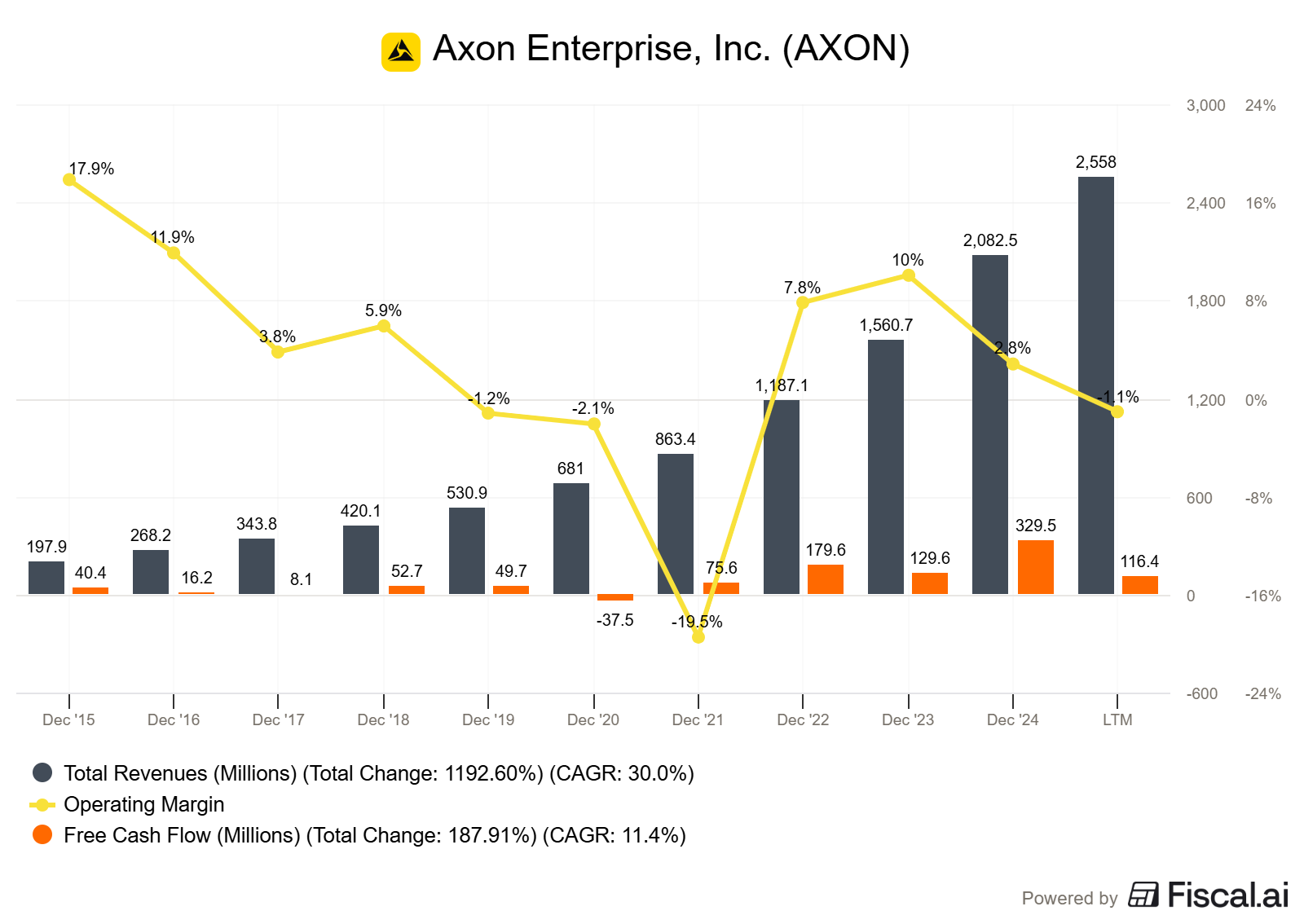
The AI returns:
Business summary paragraph explaining the Taser and body camera products, plus their cloud software platform for evidence management.
Table showing revenue growth (30%+ annually), operating margins (10-15% range), cash flow conversion (50%+ of net income), ROE above 15%.
Red flags section noting high customer concentration (government agencies) but stable relationships, no accounting concerns.
Conclusion: “Worth deeper analysis: Yes. Strong growth with improving profitability and high ROIC suggests a durable competitive position. Government concentration is normal for this sector.”
Total time: 3 minutes. You now know this deserves a deeper look.
Deep Dive in Action:
Axon passed screening. You open your Deep Dive Project and start a new conversation: “Competitive analysis of Axon Enterprise.”
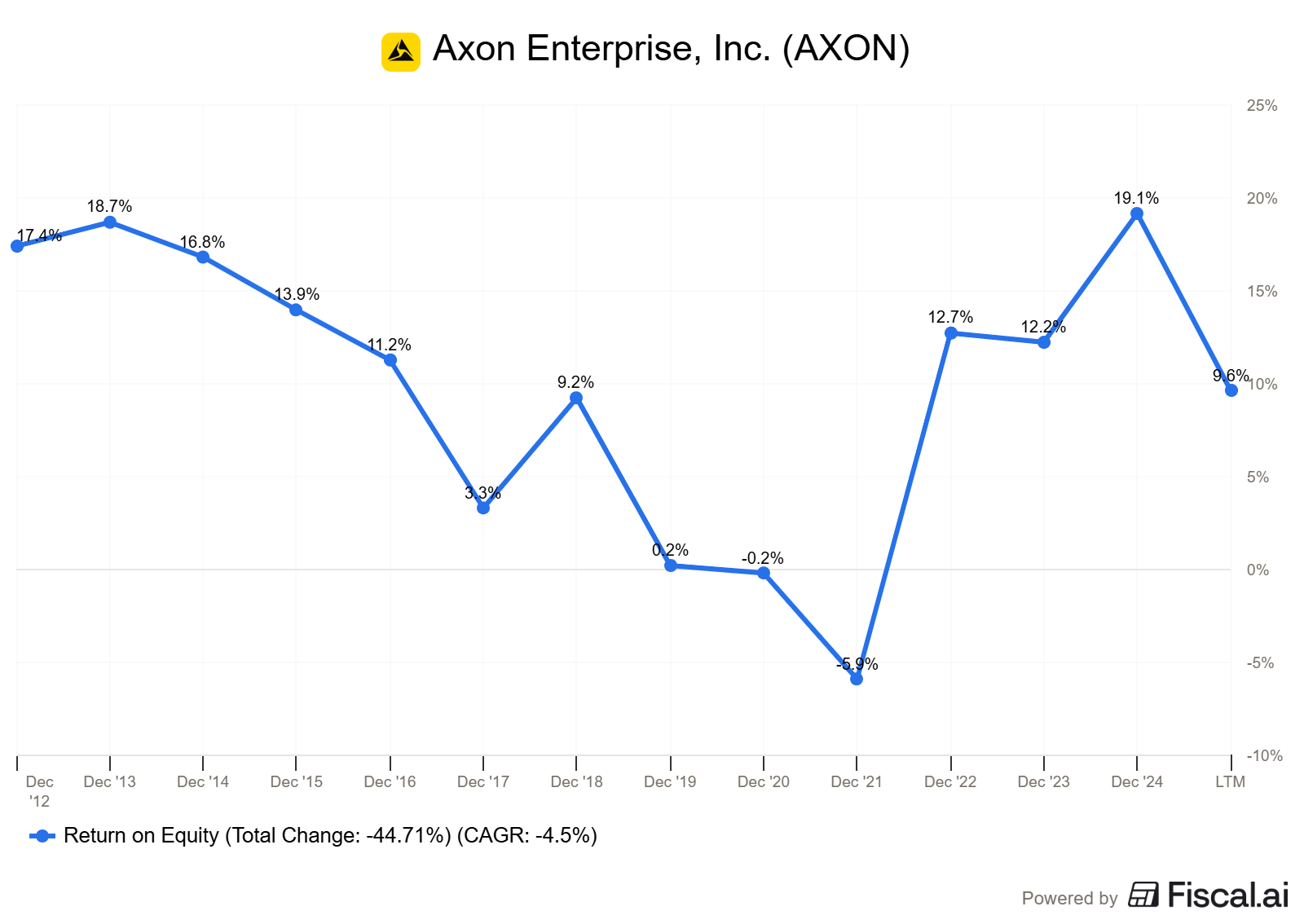
The AI maps out the competitive landscape (limited Taser competition due to patents and brand, fragmented body camera market), identifies the moat (network effects from software platform that locks in customers, high switching costs for agencies already using their system), breaks down unit economics (hardware sales with recurring software revenue creating improving margins over time), and evaluates management (founder-led, significant insider ownership, disciplined capital allocation with focus on R&D over M&A).
You ask follow-up questions: “How does their software gross margin compare to pure SaaS companies?” The AI pulls segment data from the 10-K and explains the margin profile.
You go back and forth for 20 minutes, building confidence that you understand this business.
Portfolio Review in Action:
You’ve owned Costco for two years. Q3 earnings just came out. You open your Portfolio Review Project: “Review Costco’s Q3 2024 results.”
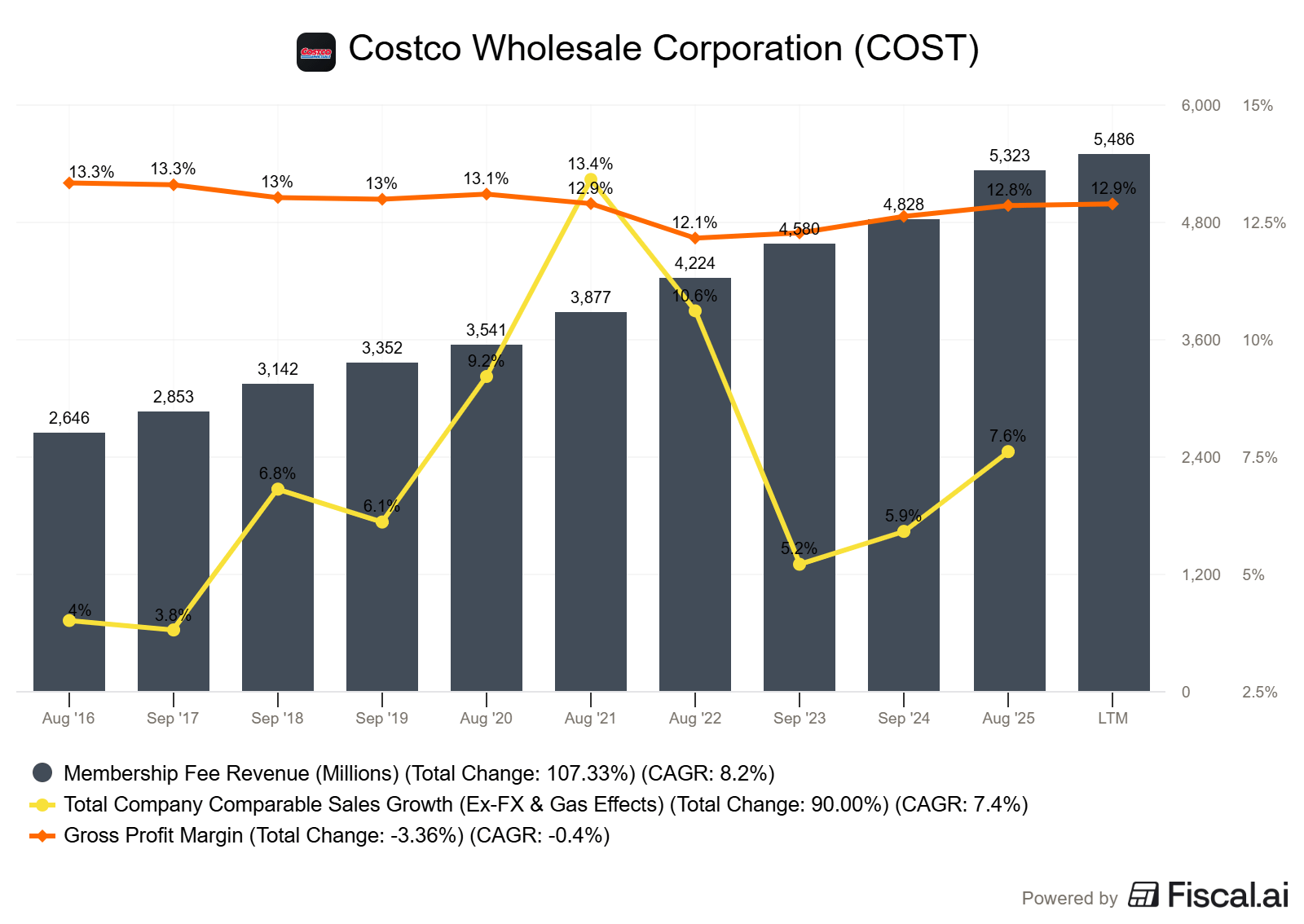
The AI summarizes: comparable store sales up 5%, membership fee income growing steadily, gross margin stable at historical levels, and continued international expansion. Thesis status: Intact. The membership moat remains strong, capital efficiency is consistent, no warning signs.
You scan the output, verify nothing concerning happened, and move to the next holding. Five stocks reviewed in 30 minutes instead of three hours of reading earnings releases.
Limitations & Best Practices
Claude Projects are not magic. Here’s what they can’t do:
They can’t access live data or real-time stock prices. You’re still responsible for directing the AI to relevant SEC filings and verifying the numbers it extracts.
They can’t make investment decisions for you. The workflows structure your analysis, but judgment about valuation, timing, and position sizing remains your job.
They don’t replace reading primary sources. Use the AI to extract and organize information, then verify key facts by reading the actual 10-K sections yourself. Trust, but verify.
Best practices I’ve learned:
Start specific, then generalize. Build your first Project for one exact use case (screening industrial companies, for example). Once it works well, broaden the instructions to handle other sectors.
Iterate the instructions based on output. After you’ve run 10 companies through a screening Project, you’ll notice patterns in what you keep asking for. Add those to the custom instructions.
Use separate Projects liberally. Don’t try to make one Project do everything. The power comes from having specialized contexts. I have separate Projects for: initial screening, deep dives, portfolio reviews, valuation modeling, sector research, and earnings call analysis.
Reference output format examples. If you want tables formatted a specific way, include an example table in your custom instructions. The AI will match the format.
Name your Projects clearly. “Screening” is too vague when you have eight Projects. “Initial Screening - Basic Financials & Red Flags” tells you exactly what that Project does when you’re choosing where to start a conversation.
Common mistakes to avoid:
Don’t make instructions too rigid. Leave room for the AI to adapt analysis to different company types. A bank needs different metrics than a software company.
Don’t skip the output format section. Consistent structure is half the value. Specify exactly how you want information presented.
Don’t forget to update Projects. Your investment process evolves. Review your custom instructions quarterly and refine them based on what’s working.
The Investment Process Payoff
Here’s what changes when you have these workflows built:
You analyze more companies. The friction of starting analysis drops to nearly zero. No more “I’ll look at that company later” because setup is annoying. You just open the relevant Project and start.
Your analysis becomes more consistent. Every company gets evaluated on the same dimensions. You don’t forget to check management compensation once and remember it the next time. The structure ensures completeness.
You catch deterioration earlier. The Portfolio Review workflow makes quarterly check-ins so easy that you actually end up doing them. You spot margin compression or competitive threats while there’s still time to act.
You build a knowledge base. Each Project becomes a library of past analysis. You can search old conversations to see how you evaluated similar companies or what questions you asked about comparable businesses.
The goal isn’t to automate investment decisions. It’s to automate the setup and structure so you can spend your time on actual thinking: Is this moat durable? How much would I pay for this growth? Does management allocate capital well?
Claude Projects handles the scaffolding. You handle the judgment.
Start with one workflow. Build your Initial Screening Project this week. Run five companies through it. Refine the instructions based on what you wish it had asked. Then build the others.
Your investment process becomes systematic without becoming mechanical. That’s the balance you’re looking for.
Dave, I am not finding the email with access to the analysis tools. Please resend. Also I'm reading the CVX piece and the poll is not available to me. What am I doing wrong?
Thank you Dave. The Portfolio Review query is especially useful at times like these. It helps to keep me in a good investment.